#SharePointProblems | Koskila.net

Solutions are worthless unless shared! Antti K. Koskela's Personal Professional Blog

Posts from 2022

Blog posts published in 2022

Posts from 2022 (56)

  • Cover image for Evil triumphs when good men do nothing
    Published on
    Authors
    koskila

    Evil triumphs when good men do nothing

    I never thought that I would write an article on this site of mine about war, peace and a threat to not only an entire nation's existence, but mine, too. But as this website has some reach (there's around 75 000 of you each month), I feel that I have a responsibility to say and do something. On February 24th, 2022, the fascist oligarchy known as Russia attacked yet another one of its neighbors. That's almost not even newsworthy by itself - it's happened multiple times before.
  • Cover image for How to replace the default fake "ACME" certificate for Kubernetes/AKS?
    NEW
    Published on
    Authors
    koskila

    How to replace the default fake "ACME" certificate for Kubernetes/AKS?

    A while back I got a request to change the default certificate for an AKS cluster. A customer didn't like the "Kubernetes Fake Certificate" that's shown when no other matching certificates can be found, and they wanted it changed. So yours truly started googling, and as a result, this article explains how to do just that! NOTE: This article has been updated and rewritten in late 2025. You can find the updated version here: How to replace the default certificate in AKS? Background

  • Cover image for How to export the private key from your Certificate Signing Request on Windows?
  • Cover image for Working YAML sample of a remote repository CI trigger in Azure DevOps
    Published on
    Authors
    koskila

    Working YAML sample of a remote repository CI trigger in Azure DevOps

    It took me something like 10 years of struggling to get remote triggers to finally fire in Azure DevOps, and in this article, I'll share how I finally got the remote repository trigger to work for an actual Team Project in real production use (and that's a first!) 😃 Okay, I know, that's a bit rich - they've been supported for maybe a few years, so there's no way I've been struggling with remote triggers for 10 years. And I haven't!
  • Cover image for winrm complaining "Error: Invalid use of command line." - easy fix :)
    Published on
    Authors
    koskila

    winrm complaining "Error: Invalid use of command line." - easy fix :)

    Heh, this article is going to be another one of those "Drat, I should've known this" articles. But maybe it'll be helpful for someone else as well! In this post I will explain how to get around the "Error: Invalid use of command line. Type "winrm -?" for help." error being thrown at you. And if you're like me (and your error is the same as mine), you'll mostly get to blame yourself for this one!
  • Cover image for How to apply a .dotx template to your existing Word files (.docx)?
    Published on
    Authors
    koskila

    How to apply a .dotx template to your existing Word files (.docx)?

    This article explains how you can apply formatting and styles from a Microsoft Office Word Document Template (.dotx) to your already existing Word Document (.docx). You might want to do this if you've got a file with plenty of content, especially if it's stuff that might break when copy-pasting (embedded media, pictures with text around them, table of contents, references - actually, anything else than just normal paragraphs). Took me a while, but this article documents how to do it.
  • Cover image for Using openssl to verify a certificate matches a private key
    Published on
    Authors
    koskila

    Using openssl to verify a certificate matches a private key

    This post explains how to verify a private key (possibly a .key file) that you somehow got your hands on, that matches a certificate file (.cer) you also somehow are in possession of. I have no idea where I got mine, but I had to figure out how to make sure a key and a certificate matched before I uploaded mine to AKS (Azure Kubernetes Service).
  • Cover image for How to avoid global.json version conflicts in Azure DevOps
    Published on
    Authors
    koskila

    How to avoid global.json version conflicts in Azure DevOps

    In Azure DevOps, you sometimes have a project that's being built with a certain .NET version. It'll require that particular SDK version, and most typically that is defined in the global.json file. However, if you also need to install a certain .NET tool, running dotnet tool install MyBuildTool will fail. And it'll fail before it actually tries to install the version of the tool you wanted! This article explains how to work around the .
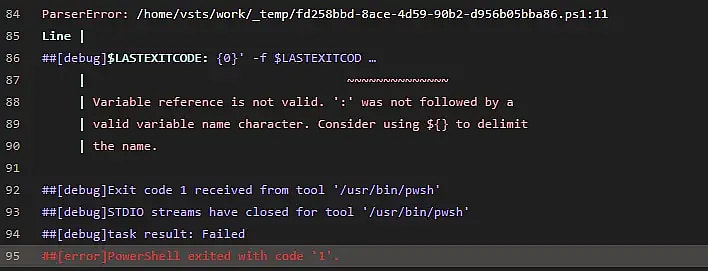
  • Cover image for How to fix Azure DevOps "Variable reference is not valid. ':' was not followed by a valid variable name character. Consider using ${} to delimit the name"
    Published on
    Authors
    koskila

    How to fix Azure DevOps "Variable reference is not valid. ':' was not followed by a valid variable name character. Consider using ${} to delimit the name"

    This article explains one possible reason why you might run into an error like " Variable reference is not valid. ':' was not followed by a valid variable name character. Consider using $ to delimit the name " when using a PowerShell task in an Azure DevOps pipeline. But hey - at least Azure DevOps is helpful enough to point out the line that causes trouble, right? Not so fast. Confusingly, the offending line might be this: Write-Host ('##vso[task.
  • Cover image for Hacktoberfest 2022
    Published on
    Authors
    koskila

    Hacktoberfest 2022

    ... And that's a wrap! This year I had the chance, and the privilege to once again participate in the month-long celebration of open-source, Hacktoberfest . And unlike last year, I took the time to write about the experience again! And for someone like me, who doesn't really do much open-source stuff, it is a bit of an experience. And the event itself has come a long way! 2022: Hacktoberfest has matured
  • Cover image for Azure DevOps fails with "The path [path-to-your-repo] does not exist" even though the repository is there for sure?
    Published on
    Authors
    koskila

    Azure DevOps fails with "The path [path-to-your-repo] does not exist" even though the repository is there for sure?

    Eh, this was a weird one. This article explains how to get around an issue where your build tools fail due to weird "path does not exist" errors when you're using bash to execute a restore to your project. The build would probably succeed nicely, but it fails due to missing dependencies - in my case, at least the whole node_modules folder was missing. And of course, it is - the restore failed, after all. But let's take one step at a time. What did I run into, this time?
  • Cover image for One way to fix "Unsupported or invalid query filter clause specified for property" for your Microsoft Graph API queries
    Published on
    Authors
    koskila

    One way to fix "Unsupported or invalid query filter clause specified for property" for your Microsoft Graph API queries

    This article explains one possible fix to an annoyingly generic exception thrown by the Microsoft Graph API (namely, "Unsupported or invalid query filter clause specified for property") or an even more generic exception thrown by PnP PowerShell ("Exception of type 'PnP.PowerShell.Commands.Model.Graph.GraphException' was thrown.
  • Cover image for Why do you get a "Missing closing ')' in expression." error when piping a collection to a for loop in PowerShell?
    Published on
    Authors
    koskila

    Why do you get a "Missing closing ')' in expression." error when piping a collection to a for loop in PowerShell?

    Today, I'm writing about a stupid error. Yeah, I do make those every now and then. After adding a for loop to my PowerShell script, I started to get annoying ParserErrors about my for loop missing a closing bracket. But it was NOT missing one - what gives? Problem So, what I was trying to do was to concatenate a kinda random collection of strings after the first few items. I was going to iterate through the strings by piping them into a loop.
  • Cover image for How to configure your Smart Home wifi devices that fail to connect due to a weak wifi signal?
    Published on
    Authors
    koskila

    How to configure your Smart Home wifi devices that fail to connect due to a weak wifi signal?

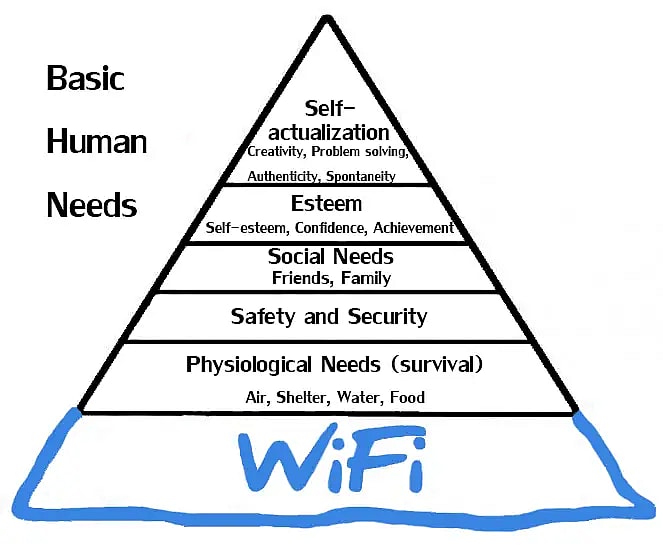
    This article describes a solution to a problem that I have had with pairing different Smart Home devices with my app or some cloud service using wifi. Weirdly, wifi can be strong enough to provide connectivity to any of the devices, but weak enough for the pairing to fail. Fun stuff. You can usually just move the devices closer to your router, but with some devices that might be a bit more complicated... But as usual, workarounds exist!
  • Cover image for How to import an Azure DevOps Git repository... From another Azure DevOps organization?
    Published on
    Authors
    koskila

    How to import an Azure DevOps Git repository... From another Azure DevOps organization?

    A while ago, I needed to move an Azure DevOps Git repository from one organization to another. And that was far easier than I thought. For once, a nice surprise from Git _and_ Azure DevOps 😀 So, let me tell you how that's done! Well, how it's done if it goes well, anyway. And if still works as it used to when you're reading this. We'll see! Solution
  • Cover image for How to fix NU3028 and NU3037 errors in Azure DevOps builds?
    Published on
    Authors
    koskila

    How to fix NU3028 and NU3037 errors in Azure DevOps builds?

    This article explains a solution to a rather annoying issue, where certificate validation for builds trying to fetch NuGet packages published by Microsoft fails when using .NET 5. This happens at least with Docker build when you're relying on some Microsoft-provided images... But probably also in a lot of other cases. Problem When running an Azure DevOps pipeline with any task that does any Docker stuff, your build fails.
  • Cover image for How to kill the process causing the "MSB3021	Unable to copy file -- The process cannot access the file because it is being used by another process." error?
    Published on
    Authors
    koskila

    How to kill the process causing the "MSB3021 Unable to copy file -- The process cannot access the file because it is being used by another process." error?

    This time, we're taking a look at an annoying situation where your previous debugging session, or perhaps your dotnet serve, somehow locks up your dlls or other important files that you kind of need to overwrite when rebuilding. And that, well, causes your build or debugging session to fail. So, let's take a closer look at the actual errors we've run ourselves into!
  • Cover image for How to replace and reload application settings changes in .NET?
    Published on
    Authors
    koskila

    How to replace and reload application settings changes in .NET?

    This article explains a curious workaround that I figured out. In case you need a way to force app setting changes to be reflected in some libraries you need in your application, even if they don't support any configuration after application startup. Problem Normally, a .NET application loads the configuration - environment variables, appsettings.json files, wherever your secrets come from, and all the other good stuff - when it's started, and it's good with that.
  • Cover image for How to store a complex object as JSON in a PostgreSQL database using Entity Framework (Npgsql)?
    Published on
    Authors
    koskila

    How to store a complex object as JSON in a PostgreSQL database using Entity Framework (Npgsql)?

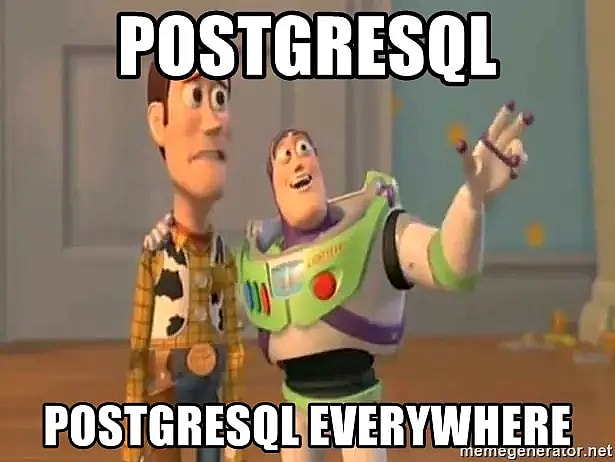
    Okay, that's a title and a half. But let's see - what are we actually doing and why? In my particular case, I had to store a Dictionary<string, string> in a Postgres database. By default, that's not something Entity Framework handles. But as usual, there's a way around that - and the same concept we'll take a look at below should work for other complex data types or objects too! Solution
  • Cover image for How to configure FQDN on a workgroup computer?
    Published on
    Authors
    koskila

    How to configure FQDN on a workgroup computer?

    My ASUS AC-68U requires an external server with a Fully-Qualified Domain Name for any logging to be persisted beyond a reboot of the router. And since the router regularly needs rebooting (and will usually just automatically reboot if any errors are encountered), logging errors without them being persisted after a reboot is pretty useless. So, a computer with an FQDN I'll need. But I don't have a domain for my computers at home, so I don't really have Fully-Qualified Domain Names , either.
  • Cover image for ASUS AiMesh tips and tricks
    Published on
    Authors
    koskila

    ASUS AiMesh tips and tricks

    This post is meant to gather my tips and tricks for surviving life with ASUS AiMesh wifi routers. Draw on my experience so that your life would be easier :) A quick word of advice before you proceed, though: you'll save yourself from a lot of trouble by buying actual networking gear instead of this flea market discount garden-variety rubbish. I got my ASUS AiMesh routers (RT-AC68U, RT-AC66U B1, and RT-AC1750) at a deeply discounted price, and I still don't think they've been worth the trouble.
  • Cover image for How to use Microsoft.Online.SharePoint.PowerShell with PowerShell 7?
    Published on
    Authors
    koskila

    How to use Microsoft.Online.SharePoint.PowerShell with PowerShell 7?

    This article explains an annoying extra step (or a really nifty trick - depending on how you choose to look at it!) that you can take to make sure your PowerShell 7 is able to import a module that was developed for .NET Framework, instead of .NET Core. This is super helpful when you run into weirdness with some of the more, let's call them CLASSICAL , PowerShell modules. Such as Microsoft.Online.SharePoint.PowerShell . Problem I use PowerShell 7 as the default shell in my Windows Terminal.
  • Cover image for How to fix "The website does not support SharePoint Online credentials. The response status code is 'Unauthorized'"
    Published on
    Authors
    koskila

    How to fix "The website does not support SharePoint Online credentials. The response status code is 'Unauthorized'"

    Whilst running some SharePoint Online PowerShell commandlets, or connecting to a SharePoint Online site from your app, you get the following (or similar) error about your SharePoint Online credentials being unauthorized for something you should definitely be authorized to do: Cannot contact web site 'https://[tenant]-admin.sharepoint.com/' or the web site does not support SharePoint Online credentials. The response status code is 'Unauthorized'.
  • Cover image for How to refresh all Az CLI subscriptions?
    Published on
    Authors
    koskila

    How to refresh all Az CLI subscriptions?

    This article explains how to "reactivate" all of your accounts stored in your az account by refreshing your sessions. You might need this if you suddenly run into a script that needs to iterate all of your subscriptions without you being there to sign in to each one of them. Having a recently active session for each will help, and you can run your massive script unattended overnight or something like that :) But let's take a step back - what's the issue we're dealing with here?
  • Cover image for How to fix another weird Entity Framework Core dependency issue?
    Published on
    Authors
    koskila

    How to fix another weird Entity Framework Core dependency issue?

    Okay - so that's a non-descriptive title if I've ever written one - I apologize for that! I just couldn't figure out a way to shorten the error when "Microsoft.AspNetCore.Diagnostics.EntityFrameworkCore" is referencing "Microsoft.AspNetCore.Http.Abstractions", and even though you're not referencing that dependency directly, you get an error where you have both 3.x and 5.x or 6.x major versions of the assembly in use. Which, in layman's terms, is no good.
Whitewater Magpie Ltd.
© 2026
Static Site Generation timestamp: 2026-02-03T09:01:56Z