How to install the VS Code wiqd extension?
After getting back to consulting, I've been in the lucky/unlucky situation where I get to create and maintain different agent setups for various clients, each with their own unique requirements and challenges.
That means I get to build agents with M365 Agents Toolkit, Foundry and even ewww Copilot Studio.
One of the recurring challenges I've faced is dealing with the quirks and unexpected behaviors of various development tools, particularly when trying to install extensions in VS Code that seem determined to resist my efforts.
Yes, I'm looking at you, wiqd!
What is WIQD?
WIQD is a development tool provided by Microsoft that integrates with Visual Studio Code to enhance the development experience when you're creating extensions (agents, skills, plugins, tools) for M365 Copilot.
It includes a command-line interface (CLI) and a VS Code extension, which together provide features such as language server support, project scaffolding, and other development utilities.
And... Drumroll please... A GitHub Copilot agent!
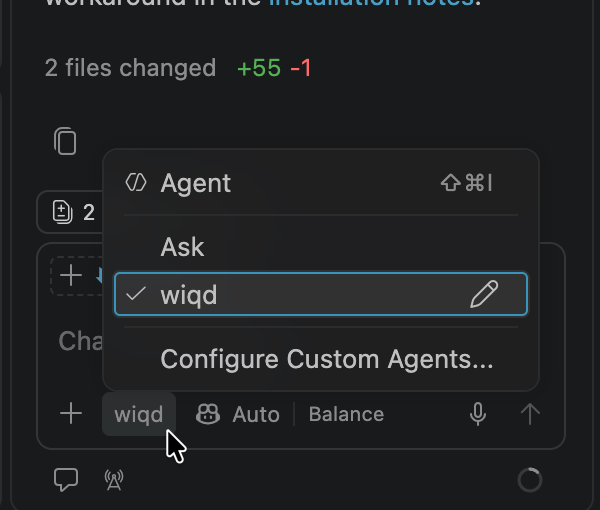
The wiqd agent basically just calls a skill called wiqd, which in turn primarily calls a cli tool called... You might have guessed it... Wiqd.
For once, Microsoft haven't messed up the naming of the tools! Yet.
Anyway - the extension claims it provides live validation to declarative agent schemas and other goodies, which is the reason I bothered to install it in the first place.
I assumed it would show some sort of live validation of the declarativeAgent.json file... But apparently not, it just provides the cli command wiqd agent validate --path <path> --env dev --mode static --json --skill wiqd --workflow wiqd-core that, well, validates the file. Or you can ask the wiqd agent to validate it. Both will be roughly as helpful as just provisioning the file from M365 Agents Toolkit - as that will be almost as quick and also validate the schema :)
But I digress... I still wanted the extension, and it still refused to install and instead actively FOUGHT me.
What do I mean "the extension FOUGHT me"?
Well - that means it actively opposed all of the different ways I tried to install it, even though I was following Microsoft's documentation.
The official wiqd documentation offers this useful one-liner for the installation: curl -fsSL https://aka.ms/wiqd/install.sh | bash
Or, if you would like to see what happens, you can run this:
curl -fsSL https://aka.ms/wiqd/install.sh -o install-wiqd.sh
cat install-wiqd.sh      # review the script
bash install-wiqd.sh     # run it
But since the install-wiqd.sh file just crashed in both bash and PowerShell, I decided to instead try a direct install in VS Code.
The first command I tried was the obvious one:
code --install-extension Microsoft.wiqd
VS Code responded with:
Extension 'microsoft.wiqd' not found.
That is not incredibly surprising. It's a preview package, I guess it isn't available on VS Code Marketplace.
But it gets weirder: trying the CLI’s own command did not help:
wiqd component vscode install
It fails with the same error - I guess it tries to just use the same extension on marketplace...
Looking into the trace after a failed install, when running WIQD 0.18.0 and trying to install the VS Code extension, the command also asks VS Code to install Microsoft.wiqd, just by ID and not by name. It does not use the extension package that ships with the CLI(!)
And if VS Code cannot resolve the ID from its extension source, the CLI command fails too. And we already know it can't.
This extension is starting to feel like it doesn't want to get installed...
Reason
I think someone vibe-packaged the release. The original issue with the install script is already reported on GitHub, too.
While both me and the reporter are trying to run this stuff on a mac, I think so is everyone at Microsoft, so if they actually tested this, they would have noticed - and besides, this probably fails for Windows as well.
Windows users just haven't had the time to report it yet because they're so busy restarting their machines they never make it to GitHub to report the issue.
Solution
Okay. Now we kind of know what's wrong. How do we fix it?
The VSIX was already bundled with the CLI
The useful clue was in the published npm package. Version 0.18.0 includes the VS Code extension as a VSIX file:
@microsoft/wiqd/vsix/wiqd.vsix
So there was no need to find a separate download or build the extension. I could install the bundled VSIX directly:
code --install-extension "$(npm root -g)/@microsoft/wiqd/vsix/wiqd.vsix" --force
For VS Code Insiders, use its command instead:
code-insiders --install-extension "$(npm root -g)/@microsoft/wiqd/vsix/wiqd.vsix" --force
The --force option makes this useful for reinstalling as well as first-time installation.
The extension installed, but the language server kept crashing
Installing the VSIX solved the Marketplace problem, but WIQD 0.18.0 had another startup problem. The output ended with:
The wiqd LSP server crashed 5 times in the last 3 minutes.
Pending response rejected since connection got disposed
Code: -32097
Those messages were consequences of the process exiting. The useful error was earlier in the wiqd output channel:
Error: Cannot find module '<workspace>/wiqd'
The extension first tries to locate the global npm package using npm prefix -g. If that fails in VS Code's extension-host environment, it falls back to wiqd.
However, it launches that value as a Node.js module, not as an executable resolved through PATH. Node then looks for a file called wiqd inside the workspace. Having a working wiqd --version in a terminal does not prevent this failure.
The workaround is to set wiqd: Lsp Path to the CLI's absolute JavaScript entry point.
On a side note: This is something I would never have figured out without a coding agent that tirelessly (and without conserving any tokens) crawls through the logs...
Anyway, to proceed, find the path in a terminal:
printf '%s\n' "$(npm root -g)/@microsoft/wiqd/bin/wiqd.js"
For my Homebrew installation (yes, I'm on a mac - I accepted the substandard user experience of mac OS for the unbeatable stability and performance), the workspace setting in
.vscode/settings.json is:
{
  "wiqd.lsp.path": "/opt/homebrew/lib/node_modules/@microsoft/wiqd/bin/wiqd.js"
}
Note, that this value will probably be different for you: The path is machine-specific; use the path printed on your own machine. Set it in User Settings instead if the same installation should serve all workspaces.
After saving the setting, run wiqd: Restart LSP Server from the Command Palette, or Developer: Reload Window. The wiqd output should now report the absolute entry point rather than just Using wiqd: wiqd.
Updating the installer
You could also change the VS Code step in install-wiqd.sh to locate the VSIX under the global npm package and pass that file to the selected VS Code command.
The change is:
"$code_cmd" --install-extension "$VSCODE_EXTENSION_ID" --force >/dev/null 2>&1
Which renders to:
code --install-extension Microsoft.wiqd --force
And you can change it to:
npm_root=$(npm root -g 2>/dev/null || true)
vscode_vsix="$npm_root/@microsoft/wiqd/vsix/wiqd.vsix"
code --install-extension "$vscode_vsix" --force
One more macOS installer bug
While checking the installer, I also reproduced a separate shell syntax error on the Bash 3.2 that ships with macOS:
syntax error near unexpected token `ps'
The cause was a case statement used directly inside process substitution in the process-tree cleanup helper. Replacing that selection with an equivalent if branch made the script parse on Bash 3.2:
if [[ "${OSTYPE:-}" == msys* || "${OSTYPE:-}" == cygwin* ]]; then
    ps -a
else
    ps -eo pid=,ppid=
fi | awk -v parent="$parent" '$2 == parent { print $1 }'
That issue was unrelated to installing the extension, but it prevented the installer from starting at all on the affected shell.
Quick recap
- The 0.18.0 wiqd installer fails on macOS
- The
@microsoft/[email protected]npm package containsvsix/wiqd.vsix. - The package installs successfully
The practical takeaway: when an extension ID cannot be found by VS Code, check whether the tool’s npm package already ships a VSIX before assuming the extension needs to be fetched from the Marketplace.
Ridiculous, I know, but it worked. Or at least the wiqd agent became available in VS Code.
Comments
No comments yet.