#SharePointProblems | Koskila.net

Solutions are worthless unless shared! Antti K. Koskela's Personal Professional Blog

All Posts

Browse all blog posts and archives

All Posts (543)

Showing 476 to 500 of 543 posts (Page 20 of 22)
  • Cover image for How to output console or PowerShell transcript to a file in Windows
    Published on
    Authors
    koskila

    How to output console or PowerShell transcript to a file in Windows

    Every now and then, you will run into a situation, where you will need to somehow dump the console output (or transcript) of running a console application. I'm actually going to argue it happens a lot more often than one would think - in my case, any time a customer requires a webjob or a function, that one would normally deploy to Azure, being run on the servers of the customer. You'll need a way to store console (or PowerShell) output into a file. This post describes how to do that.
  • Cover image for How to solve the "Unified Groups aren't supported." -error
    Published on
    Authors
    koskila

    How to solve the "Unified Groups aren't supported." -error

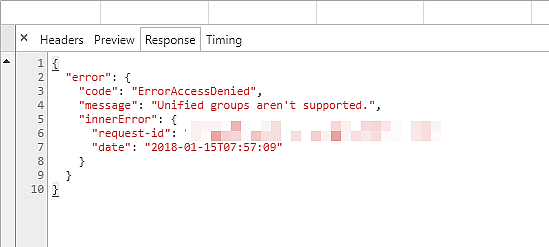
    When trying to use some functionality, that relies on Unified Groups, you're getting errors in the console, similar to this: "Unified Groups aren't supported." In truth, this most likely means, that Unified Groups (that's the internal/technical name for Office 365 Groups ) is not enabled for this particular user . That breaks a bunch of different features for them since the Graph API for Groups of course won't work. This post describes one way to fix this issue! How to solve this?
  • Cover image for How to Resolve Managed Metadata Madness in SharePoint?
    Published on
    Authors
    koskila

    How to Resolve Managed Metadata Madness in SharePoint?

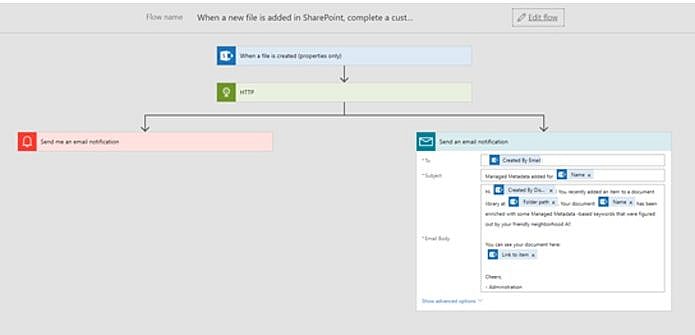
    Using Azure Functions and Cognitive Services Text API to enrich a Flow that fills Metadata for new items in a Modern SharePoint Team Site. That's, in a nutshell, the solution I submitted to a recent online hackathon. Quite a mouthful, isn't it? The whole solution (and a public vote, if you're interested!) is available here: https://devpost.com/software/resolving-managed-metadata-madness-in-sharepoint - this blog post will describe the solution and the reasoning behind it.
  • Cover image for Using "DetectedLanguage" to return only localized results from SharePoint Search index
    Published on
    Authors
    koskila

    Using "DetectedLanguage" to return only localized results from SharePoint Search index

    Localization and targeting of content in multilingual SharePoint installations is always an issue. SharePoint offers a multitude of ways to profile content based on user language (or other properties), but none of the solutions are foolproof. This post describes how to fetch only localized results from the SharePoint Search index, which solves at least some of the issues. Description SharePoint Search index can be used in quite a few different ways.
  • Cover image for How to form links to Planner tasks
    Published on
    Authors
    koskila

    How to form links to Planner tasks

    Office 365 Planner is a neat tool for task management. However, when you, for whatever use case, need to form URLs that point you towards a single task (or a bucket, or a plan for that matter), you might run into trouble with how the URL is formed. Custom domains actually make it a bit complicated, but luckily there's a workaround! Description of the issue If you have multiple domains in your Azure AD, your Planner might end up using your custom domain in its URLs.
  • Cover image for Call to sites Graph API requires "owner" permissions for site collection regardless of app permissions
    Published on
    Authors
    koskila

    Call to sites Graph API requires "owner" permissions for site collection regardless of app permissions

    Okay - yet another weird issue, and a hacky workaround. I was developing an app that was calling a SharePoint site through Graph API, using jQuery $.ajax call (developed in TypeScript), and ran into surprising 401 errors. I did find a workaround but am also working on an actual fix. Description To get SharePoint site ID, which is needed when accessing SharePoint lists, the calls seemed to fail for my test accounts.
  • Cover image for How to fix the "The SPListItem being updated was not retrieved with all taxonomy fields" error
    Published on
    Authors
    koskila

    How to fix the "The SPListItem being updated was not retrieved with all taxonomy fields" error

    Are you getting an error like "The SPListItem being updated was not retrieved with all taxonomy fields" when you try adding or modifying values in a TaxonomyField of a list item in SharePoint, either using the GUI or with PowerShell or even programmatically? Then read ahead, I've got a quick and dirty solution!
  • Cover image for Alternative Languages in SharePoint forcing the (cumbersome) use of localized Managed Properties
    Published on
    Authors
    koskila

    Alternative Languages in SharePoint forcing the (cumbersome) use of localized Managed Properties

    Localization and multilingual environments in SharePoint are an endless source of interesting issues and blog post topics. In one case, we had a tenant created originally in English, and a site collection created in Finnish. In this particular case, SharePoint somehow messed up the language settings and ended up requiring the use of localized managed property names on the search center of that site collection. Nowhere else, though.
  • Cover image for How to resolve Webpart title changes not reflecting for some users?
    Published on
    Authors
    koskila

    How to resolve Webpart title changes not reflecting for some users?

    This article describes an interesting feature of the Multilingual User Interface in Classic SharePoint . So, in short, I encountered another, very interesting feature of Classic SharePoint Publishing sites, where multiple display languages were in use. When changing the web part title on a web part on a Classic SharePoint page, it seems like SharePoint saves the changes for you. In reality, only some users see the changes.
  • Cover image for 4 ways to fix error AADSTS65001 (The user or administrator has not consented to use the application)
    Published on
    Authors
    koskila

    4 ways to fix error AADSTS65001 (The user or administrator has not consented to use the application)

    ---------------example-12------------------" rel="nofollow ugc">https://docs.microsoft.com/en-us/powershell/module/sharepoint-pnp/connect-pnponline?view=sharepoint-ps#------------------example-12------------------ approved: true type: comment parent: '27700' userId: '1' id: '27702' author: p whelan email: [email protected] url: '' ip: 54.246.135.213 date: '2020-09-11 10:10:17' content: |- Connect-PnPOnline -Url $SiteURL -Credentials Get-Credential I get the rather perplexing .
  • Cover image for How to use the Azure AD associated with your SharePoint Online
    Published on
    Authors
    koskila

    How to use the Azure AD associated with your SharePoint Online

    With the usual configuration of Office 365 and Azure, there might be multiple Azure AD (AAD) instances associated with your subscription. When creating registrations to whatever SharePoint-related apps that you might be using, if you create the registration to the wrong Azure AD, it can't access the data in your SharePoint. Or at least without further configurations, it probably won't get any data from your Office Graph API or whatever else you might want to use.
  • Cover image for New version of Microsoft.IdentityModel.Clients.ActiveDirectory (ADAL.NET) is out - good time to update!
    Published on
    Authors
    koskila

    New version of Microsoft.IdentityModel.Clients.ActiveDirectory (ADAL.NET) is out - good time to update!

    There's now a new version of the assembly Microsoft.IdentityModel.Clients.ActiveDirectory available - plenty of reasons to update right away! Let me offer you one hot take on the matter since the earlier 3.x -versions of the package had some issues. Why bother updating? In an earlier post , I described an issue I had with Microsoft.IdentityModel.Clients.ActiveDirectory.Platform not getting copied during the build in a referencing project. In 3.17.
  • Cover image for A quick (and handy!) hack to force referenced assembly to getting copied to a project
    Published on
    Authors
    koskila

    A quick (and handy!) hack to force referenced assembly to getting copied to a project

    Visual Studio failing to copy a referenced assembly to a project in build might lead to surprising runtime errors. This post will explain one method of fixing these issues, using Microsoft.IdentityModel.Clients.ActiveDirectory as the example - as earlier versions of that assembly had this issue! Problem After the build, you might get this kind of error: Could not load file or assembly 'Microsoft.IdentityModel.Clients.ActiveDirectory.Platform, Version=3.13.1.
  • Cover image for The effect of using Managed Navigation instead of Structural on SharePoint Online
    Published on
    Authors
    koskila

    The effect of using Managed Navigation instead of Structural on SharePoint Online

    Have you ever noticed that your SharePoint site just gets slower and slower? That's probably because the performance of Structural Navigation is absolutely horrible, especially vs. Managed Navigation. This blog post includes our findings about the issue, and I also include some explanation of the reasons behind the difference and a simple comparison to Search-based navigation.
  • Cover image for Solving Microsoft Teams Licensing Error "errorCodeTeamsDisabledForTenantForbidden"
    Published on
    Authors
    koskila

    Solving Microsoft Teams Licensing Error "errorCodeTeamsDisabledForTenantForbidden"

    This post explains how to fix the "errorCodeTeamsDisabledForTenantForbidden" error when trying to add guest users to the Microsoft Teams channel. This issue might arise when a user is invited to a channel in your organization's Microsoft Teams for the first time. Fixing it usually just requires just a flip of a switch, but might also include some waiting. Symptoms You get an error screen like this when trying to join a Teams channel as a guest user.
  • Cover image for SharePoint-Teams -integration using a tab
    Published on
    Authors
    koskila

    SharePoint-Teams -integration using a tab

    This post describes one possible scenario for SharePoint-Teams -integration, how to achieve that, and what kind of issues there might be. Teams? What's that? At Blue Meteorite, we at the Valo team have been leveraging Teams since early 2017 as our main communications channel. For us, it complements Yammer, email, and Skype for Business quite nicely, although to be fair, it's not always 100% clear which channel would be optimal for a certain piece of communication...
  • Cover image for How to solve errors about missing PnP Cmdlets on PowerShell
    Published on
    Authors
    koskila

    How to solve errors about missing PnP Cmdlets on PowerShell

    This blog post briefly describes how to solve some of the most typical errors about missing PnP Cmdlets when using Windows Powershell (or SharePoint Online Management Shell). Symptoms When trying to run some PnP-related cmdlet, you get an error similar to the ones below: Connect-PnPOnline : The term 'Connect-PnPOnline' is not recognized as the name of a cmdlet, function, script file, or o perable program.
  • Cover image for Fixing the "For security reasons DTD is prohibited in this XML document." issue
    Published on
    Authors
    koskila

    Fixing the "For security reasons DTD is prohibited in this XML document." issue

    This post describes a couple of ways to fix the issue "For security reasons DTD is prohibited in this XML document" . At least for me, it appeared when trying to access SharePoint Online using Powershell or a console program using OfficeDev.PnP (which in turn uses CSOM). Error When running any piece of code, whether in PowerShell, .exe console, or anything else than the code behind relies on .
  • Cover image for Unorthodox configuration: How to use VLK and Click-to-run Office Apps side-by-side (Visio and Office 2016 as an example)
    Published on
    Authors
    koskila

    Unorthodox configuration: How to use VLK and Click-to-run Office Apps side-by-side (Visio and Office 2016 as an example)

    Ever had issues with different versions of Office programs not living in harmony together? Me too! This post describes how I was able to fix the issue and get Visio and Office 2016 of different installation types to play well together. Preface This blog post was inspired by my need to have Office 365 ProPlus (2016 versions) and Visio running side-by-side on my laptop. That turned out to be a lot more complicated than it arguably should be, so I documented the steps for further use.
  • Cover image for How to prevent Outlook and other programs from stealing focus
    Published on
    Authors
    koskila

    How to prevent Outlook and other programs from stealing focus

    Imagine being deeply focused on a very important and time-sensitive task and, all of a sudden, an incoming email throws you off by jumping into focus. I am sure you don't need to imagine too hard as this has likely annoyed you in the recent past too, right? Here is a guide to help you make sure that no piece of software has the ability to "jump to the top" and activate your cursor on it, letting you carry on working on that important task without taking your focus away.
  • Cover image for USA 5: Working for Valo Intranet - and what've I been up to last few months
    Published on
    Authors
    koskila

    USA 5: Working for Valo Intranet - and what've I been up to last few months

    I haven't actually written that much about my daily work on this blog. I'm currently most involved with Blue Meteorite's North America team and specialized in partner acquisition and support. Most of my time is spent either onboarding new partners or supporting the old ones in their Valo Intranet deployments. And boy, is that not a lot of fun to do!
  • Cover image for Using SharePoint Search Query Tool
    Published on
    Authors
    koskila

    Using SharePoint Search Query Tool

    If you're working on SharePoint deployments, and aren't familiar with the SharePoint Search Query Tool, you're probably doing something wrong. Or you've got a really troublefree tenant and simple requirements.. :) At least for technical issues, it's the #1 tool for debugging what's in the index and what isn't. This blog post describes how to use it to investigate SharePoint Online Search index issues. First of all, you can get the tool from here: https://github.com/pnp/PnP-Tools/releases .
  • Cover image for EIG / Site5 review - Part 2, the Aftermath
    Published on
    Authors
    koskila

    EIG / Site5 review - Part 2, the Aftermath

    This is part 2 in my " One web developer's story about the downfall of web hosting " series - a frustrating firsthand experience with a formerly-great web hosting provider taken over by EIG (Endurance International Group). You can find the first post here: EIG/Site5 review - Part 1, experience with Site5 before and after EIG takeover I was able to actually get most of the money EIG got from me back from them by opening a Visa claim.
  • Cover image for The easiest way to debug Seed-method in Code-first migrations in Entity Framework
  • Cover image for Using Google Analytics with SharePoint
    Published on
    Authors
    koskila

    Using Google Analytics with SharePoint

    This post describes why it's beneficial to use a user analytics tool in your intranet. I use Google Analytics as an example of such a tool, and different deployment options for SharePoint intranets are covered briefly. Why would I use Google Analytics with my SharePoint intranet? In general, it's absolutely necessary for you to know your users if you want to deliver an enjoyable user experience. One key aspect of knowing them is knowing what they do, while they use your system or service.
Whitewater Magpie Ltd.
© 2026
Static Site Generation timestamp: 2026-05-05T05:31:42Z