M365 Agents Toolkit Azure provisioning failures
In this article, I'll share the least fun error I've recently had to deal with while building / deploying bots - I mean, agents - with Bot Framework, I mean, Microsoft 365 Agents SDK on macOS.
And of course how to get around the issues. Because if I didn't find a workaround, I wouldn't be sharing this, would I?
No, I would be crying about it on a GitHub issue or LinkedIn or something. Both of which I kind of did, but I also found a workaround, so here we are.
Background
I've been dabbling in agent development for a couple of years now, lately mostly with the M365 Agents Toolkit & SDK.
The toolkit has certainly come a long way. Only a year ago it felt poorly duct-taped together, and Copilot was fairly unhelpful in troubleshooting it.
And the agentic creation process Microsoft introduced maybe half a year ago was just sad. I tried it a few times, and it generated completely unbuildable solutions that weren't even close to being bots.
But now? Boy have I seen some improvements! The toolkit is much more stable and Copilot is genuinely helpful now!
That said, it's not all without problems... 😅
Problem
So you will constantly run into different problems. But that's alright - that's part of the development process - and the problems are usually pretty straightforward to solve.
But lo and behold, I ran into a problem that was just... baffling.
Suddenly, I started getting this pop-up on the bottom right side of my VS Code window every few seconds:
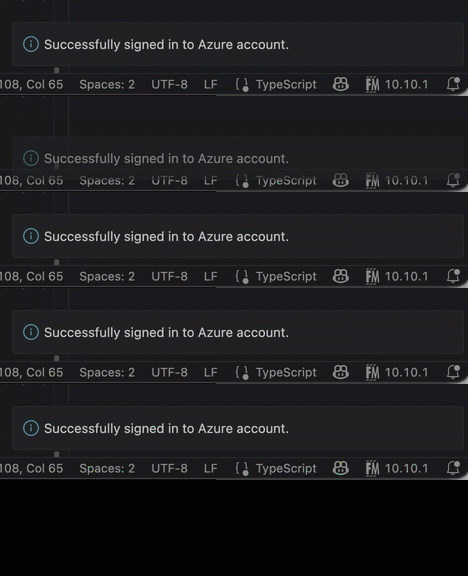
That's a bit odd. Sure. But it didn't seem to be causing any issues, so I ignored it.
Until I tried to provision my bot to Azure. Then I got this error:
[2026-04-30T12:08:58.140Z] [Info] - Executing provision

Lifecycle stage: provision(7 step(s) in total). The following actions will be executed:
(1/7) Action botAadApp/create: create a new or reuse an existing bot Microsoft Entra app.
(2/7) Action arm/deploy: Deploy the given ARM templates to Azure.
(3/7) Action botFramework/create: creates or updates the bot registration on dev.botframework.com
(4/7) Action teamsApp/create: create app.
(5/7) Action teamsApp/validateManifest: validate app.
(6/7) Action teamsApp/zipAppPackage: build app package.
(7/7) Action teamsApp/update: update app.

[2026-04-30T12:08:58.140Z] [Info] - Executing lifecycle provision
[2026-04-30T12:08:58.141Z] [Info] - Executing action botAadApp/create
[2026-04-30T12:08:58.415Z] [Info] - Bot Microsoft Entra app creation skipped.
[2026-04-30T12:08:58.415Z] [Info] - Used existing Microsoft Entra application with client id abcdef00-0000-1234-5678-000000000000.
[2026-04-30T12:08:58.415Z] [Info] - Action botAadApp/create executed successfully
[2026-04-30T12:08:58.416Z] [Info] - Executing action arm/deploy
[2026-04-30T12:09:18.663Z] [Info] - origin error message is :
{
  "name": "Error",
  "message": "No claims found in authentication challenges"
}
[2026-04-30T12:09:18.666Z] [Error] - Failed to Execute lifecycle provision due to failed action: arm/deploy. GetArmDeploymentError:The ARM templates for deployment name: 'contoso-bot' couldn't be deployed in resource group 'contoso-agent' for reason: No claims found in authentication challenges.
Unable to get detailed error message due to: No claims found in authentication challenges.
Refer to the resource group contoso-agent in portal for deployment error.. Env output: {"BOT_ID":"abcdef00-0000-1234-5678-000000000000","SECRET_BOT_PASSWORD":"******"}
[2026-04-30T12:09:18.668Z] [Info] - Execution summary:

Summary:
(×) Error: Lifecycle stage provision failed.
  (√) Done: botAadApp/create executed successfully.
    (√) Done: Used existing Microsoft Entra application with client id abcdef00-0000-1234-5678-000000000000.
  (×) Error: arm/deploy failed.
    (×) Error: The ARM templates for deployment name: 'contoso-bot' couldn't be deployed in resource group 'contoso-agent' for reason: No claims found in authentication challenges.
Unable to get detailed error message due to: No claims found in authentication challenges.
Refer to the resource group contoso-agent in portal for deployment error.
  (!) Warning: botFramework/create was not executed.
  (!) Warning: teamsApp/create was not executed.
  (!) Warning: teamsApp/validateManifest was not executed.
  (!) Warning: teamsApp/zipAppPackage was not executed.
  (!) Warning: teamsApp/update was not executed.
So the key part is here:
"No claims found in authentication challenges"
Okay. Stale authentication? Old tokens? Let's try signing out and back in to Azure in VS Code.
Turns out, that was more easily said than done!
Way back when, in the oldentimes of yore (a few months ago), you could just click on the Azure Account -section in the M365 Agents Toolkit extension in VS Code and sign out.
But now, that option is gone. There's literally no "Sign out" button for the Azure subscription (even though there is for Microsoft 365 account).
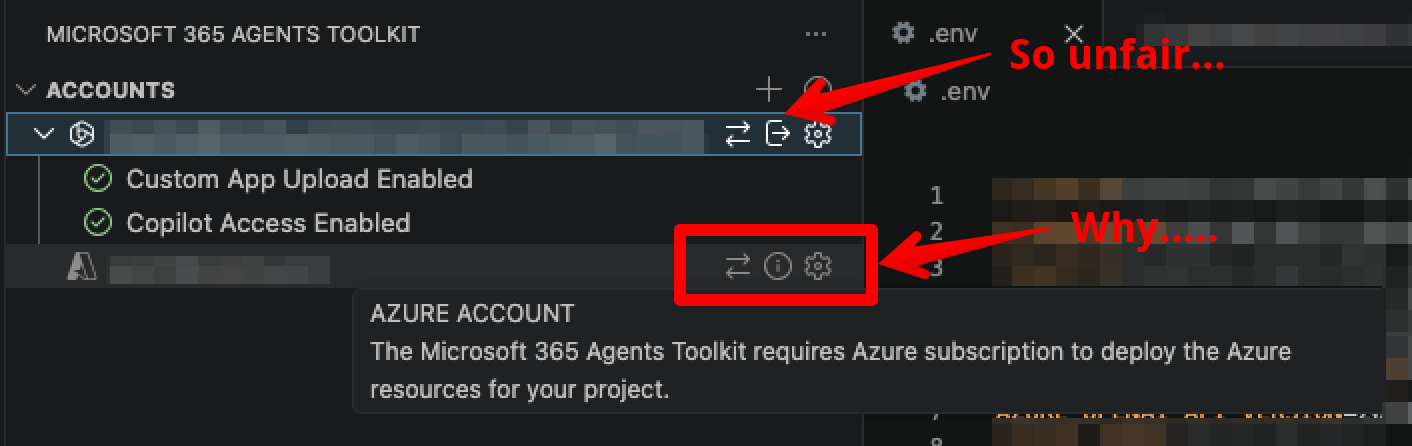
And if you try to sign out of your Microsoft 365 account, it doesn't actually sign you out of Azure, so it doesn't help with the issue at hand.
Well - luckily, you can always use the VS Code command palette, since M365 Agents Toolkit has a command for signing out of Azure accounts.
It's quite convenient, really - just select "Microsoft 365 Agents Toolkit: Sign out of..." and you're good to go!

Except THAT is just a lie. This is what selecting the "Sign out of Azure" option does:
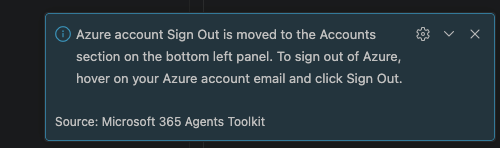
Nice. What a Catch-22. Signing out of Azure using the Toolkit is disabled, and moved to the command palette, but the command palette only tells you to sign out using the UI. Which - again - isn't available.
And all the while this stupid pop-ups keeps.. Well, popping up. All. The. Time.

Anyway. Let me save you 3 000 000 tokens and 2 hours. What WAS the solution..?
Solution
This is a bit of a nuclear option, but it worked for me.
The solution is to nuke the Azure credentials from your macOS keychain.
And whereas on Windows, I'm pretty sure this would cause all kinds of side effects with OneNote and OneDrive and whatnot getting confused - apparently, on a mac, it simply forces the M365 Agents Toolkit to re-authenticate with Azure (I guess it nukes the Azure Account that can be cached between multiple extensions - not just M365 Agents Toolkit), and it seems to work just fine after that.
The commands below will delete the cached Azure credentials from your keychain:
# Delete cached tokens
security delete-generic-password -s "azureAccountProviderCredentials|accessTokenCache-iv" && echo "deleted iv" || echo "not found iv"
security delete-generic-password -s "azureAccountProviderCredentials|accessTokenCache-key" && echo "deleted key" || echo "not found key"
If you want to make sure they're not there anymore, you can run this command to list all saved VS Code, Azure and Microsoft-related credentials in your keychain:
# Find VS Code Azure Account keychain entries
security dump-keychain 2>/dev/null | grep -E '"svce"' | grep -iE "vscode|azure|microsoft" | sort -u | head -30
No side effects that I have noticed so far, but your mileage may vary, so proceed with caution.
That's it for this week, really.
Comments
No comments yet.