Giving Copilot agents actions with Work IQ and APIs
This article explains how to give declarative Copilot agents the ability to perform actions using Work IQ and APIs, while maintaining scoped permissions and safe operation... At least for the most part.
Trust me - it's super powerful. But not always the most transparent of a process!
Background
Finally, I had the time to finalize this one. Took me a bit, and I'm sorry about that... But I had multiple other (somestimes more urgent) posts and talks to prepare in the meantime 😅
But all that said, welcome to part 3 of Baby Steps to Copilot Mastery, a five-part series about building useful declarative Microsoft 365 Copilot agents. Last time, we gave the agent support tickets to search and explain. Useful, but eventually somebody will ask the obvious question: Can it actually do anything about them?
And the answer is Yes! Our HELish Summit demos with Gautam added Microsoft 365 escalation tools and a GitHub issue-closing agent without building a custom agent runtime (or ANY other backend!)
This post covers how those integrations work, and where some actual platform controls come into play.
Knowledge and actions do different jobs
In the earlier posts, I showed how the agent could read and explain information from various sources using Copilot Connectors.
A properly configured connector gives the agent stuff to work with, such as indexed ticket information - a READ operation. It does not grant any useful WRITE abilities, such as sending email, creating meetings, or updating the source issue.
Those operations come from tools. A tool can read current information as well as change it, so "action" does not automatically mean "write". In this example, we use a live GitHub read before deciding whether an issue should be closed.
Microsoft still hosts the agent and decides which declared tool to call. We provide the instructions, tool descriptions, authentication configuration, and the supported operations.
The key point is that we let Microsoft handle hosting and all the other boring stuff. We don't need to implement a second Copilot backend just to call an API 😅
Supercharge your declarative agents
Introducing MCP servers, Work IQ and regular APIs as the building blocks for declarative agents.
Work IQ for Microsoft 365 operations
Our Internal Support Escalation sample on GitHub uses (and declares) four Work IQ plugins:
| Plugin | Its job in the escalation workflow |
|---|---|
| Work IQ User | Resolve the engineer and ticket owner to the correct people |
| Work IQ Mail | Check recent escalation emails and send a requested escalation |
| Work IQ Calendar | Check meetings and arrange a requested escalation meeting |
| Work IQ Teams | Post a requested escalation message to the designated channel |
The plugin manifests use a RemoteMCPServer runtime and refer to a shared OAuth vault registration through MCP_DA_AUTH_ID. They are simply descriptions of existing Microsoft-hosted capabilities, not implementations of mail or calendar clients.
The supplied setup requires a Microsoft 365 Copilot license, Work IQ MCP preview access, delegated permissions with admin consent, and the relevant tools allowed in the tenant. In the future, probably also a billing policy set up for Work IQ (as it is a PAYG/UBB offering). Users also complete the runtime sign-in prompts.
These are the Microsoft-hosted tools used by the sample. Don't assume that every custom MCP server or every Agent 365 registration route is supported in every declarative-agent host.
Also, the sample endpoints contain a demo tenant ID, and its Teams instructions contain a specific team and channel. Those need your own configuration. Don't blindly copy them 🫠
Give the tools a job, not just a name
The escalation instructions describe a specific process:
- Retrieve the ticket and assess the evidence: urgency, status, age, customer impact, and deadline risk.
- Recommend Escalate, Monitor, or No escalation, explaining why.
- Resolve the engineer and owner. Ask when an identity is ambiguous instead of guessing an address.
- Check mail and meetings from the previous 24 hours for an existing escalation. Warn about duplicates.
- Prepare the recipients, message, and meeting details before a requested write.
In the sample, we define some steps (or prompts...) for the process. "Prepare an escalation plan" is deliberately different from "send the escalation email". Don't care too much about the specifics: think of these as declared behavior offered to the agent, not as a deterministic workflow engine. Instructions improve the odds of the right behavior; permissions and platform controls determine what can actually be executed, and your role (after provisioning) is to keep your fingers crossed and observe the outcomes.
One other detail: the Work IQ manifests use dynamic tool discovery with run_for_functions: ["*"]. The written workflow is narrow, but the tools exposed by those servers can be broader.
When implementing your scenarios, make sure to review the discovered tools and supported ways to restrict them - don't treat the demo as a least-privilege production configuration, because it is not one. 😅
Beyond Microsoft 365: a small GitHub API plugin
Our Internal Support Closure agent sample calls GitHub directly. Its OpenAPI description includes only three operations:
| Operation | HTTP method | Purpose |
|---|---|---|
getIssue |
GET |
Read the issue's current state and content |
addIssueComment |
POST |
Record the resolution note |
updateIssue |
PATCH |
Close or reopen the issue |
In the sample, the target repository is fixed: gautamdsheth/collabdayshelsinki2026. The agent supplies an issue_number, available within that repository. That removes two opportunities to guess incorrectly and keeps the declared API surface small - but might not work for your use case. Adjust accordingly!
The plugin manifest adds descriptions, OAuth configuration, and some simple instructions for confirmation and response semantics. The response cards make it easy for the user to inspect the actual data at source.
One of the main takeaways is that you do not need to import the entire GitHub API just to close an issue. More endpoints would mostly give you more things to explain, test, and worry about.
Authentication with write rights != approval to write
The closure sample uses a GitHub App's user-to-server OAuth flow. The app's permissions, installation scope, and signed-in user's access all matter. No separate backend needed!
The provisioning YAML registers and updates the OAuth configuration, including its refresh URL, then writes GITHUB_AUTH_ID. The plugin simply references that registration.
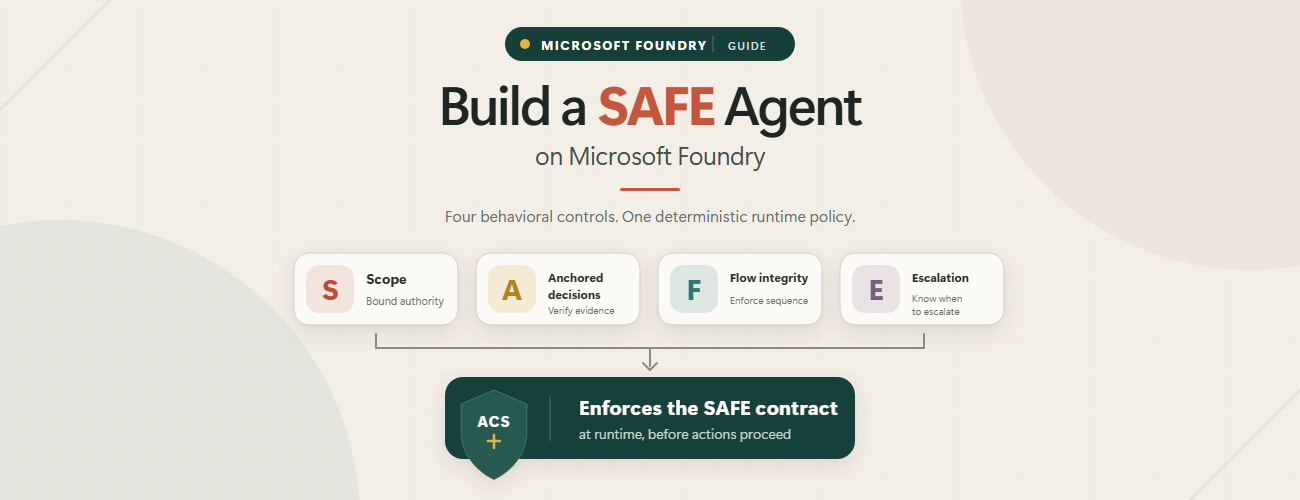
Following Microsoft's SAFE principle*, signing in establishes access but does not imply blanket approval for all future actions. Each consequential operation, such as closing an issue, requires explicit confirmation through the defined tool contract.
Preview the effect, then use native confirmation
The GitHub OpenAPI description explicitly marks the read as non-consequential and both writes as consequential. This excerpt is from the PATCH operation in the API specification:
patch:
  operationId: updateIssue
  summary: Close or reopen a support ticket issue
  x-openai-isConsequential: true
The full operation also declares its parameters, request body, and responses. The important bit here is that the confirmation requirement is represented in the tool contract, not only in prose asking the model to behave.
Because we all know how well instructions alone guide behavior, don't we..?
For Work IQ, the control mechanism is different: the server's tool definitions and the host determine the confirmation behavior. Verify that behavior in your tenant - the GitHub OpenAPI flag is not a setting you can paste into a remotely hosted MCP server you don't own.
Closing a ticket, step by step
The closure instructions start with the indexed ticket and its link. They take the issue number from that URL, never from the ticket ID. If the link is missing or points at another repository, the agent should stop.
Then the intended workflow is:
- Read the GitHub issue with
getIssue. - Compare its live state with the indexed ticket status. A resolved ticket with an open issue is the normal closure candidate; an already closed issue needs no additional closure.
- Flag a mismatch. Closing an active ticket requires the user to acknowledge that mismatch and explicitly request the override.
- Preview a grounded resolution note. If the source records no fix, say so rather than inventing a successful remediation.
- Post the note through its native confirmation, then request the state change through a separate confirmation.
- Report the actual results, including whether the issue was closed and which comment was created.
The closure reason also matters: completed is for work that was done; not_planned is for something dismissed or not being fixed. If the evidence doesn't tell you which applies, ask.
The comment and state update are separate operations, not a transaction. If the comment succeeds and closing is declined, the comment remains. If a request times out, check what happened before repeating a non-idempotent write. Two identical resolution notes are not twice as resolved.
Also, updating GitHub does not rewrite the connector's local JSON fixture. The live issue and indexed ticket can disagree until the underlying data and index are updated. Don't present one successful API call as synchronization of the entire system.
Safe and gradual adoption
When you give your declarative agents access to live systems, start cautiously and incrementally. You can't debug the agent, and unless you set it up on a completely separate test tenant (and all other test integrations), you're simply testing in production.
However you approach the project, adapt the fixed repository paths, indexed links, OAuth setup, and Teams destination together.
Start with assessment and live reads. Then try one confirmed write on a disposable issue, followed by the same request with the confirmation declined. Check the actual issue or message, not just Copilot's description of its achievements, because it'll happily lie to you 😅
The sample repository contains both agents. For the architectural starting point, see why I start with declarative agents; for the indexed side, see the knowledge-source article.
The next two topics are packaging these agents with Agents Toolkit and troubleshooting them when the happy path stops being quite so happy. Planned for December, unless Microsoft makes even more changes to M365 before then than expected. Ignite is this week, so stay tuned for any updates from there... 👀
References and footnotes
- Plugins for Microsoft 365 Copilot
- Confirmation prompts for MCP and API plugins
- Manage tools for agents
(*) What does SAFE stand for?
S – Scope:
Defines and limits the boundaries of what the agent is authorized to do.
A - Anchored Decisions:
Ensures the agent relies on verified, trusted evidence or inputs before taking action.
F – Flow Integrity:
Monitors and enforces the correct multi-step sequence and state progression of the agent's workflow.
E – Escalation:
Determines the exact conditions under which the agent must stop, refuse a prompt, or hand over control to a human.
Or as Microsoft puts it:
Comments
No comments yet.